

← WordPress & WooCommerce Development

FREE DOWNLOAD · VERSION 1.1.0

Category Discount

Create quantity-based discounts for selected WooCommerce product categories. Configure minimum quantities and percentage discounts, with optional attribute filters. The highest matching percentage is used when rules overlap.
What Category Discount helps you do

Category rules

Select one or more product categories for each offer.

Quantity thresholds

Set the minimum combined quantity shoppers need to qualify for a discount.

Percentage discounts

Choose the discount percentage. Matching products receive the highest applicable percentage.

Optional filters

Narrow a rule by product attribute and term, and enable or disable offers as needed.

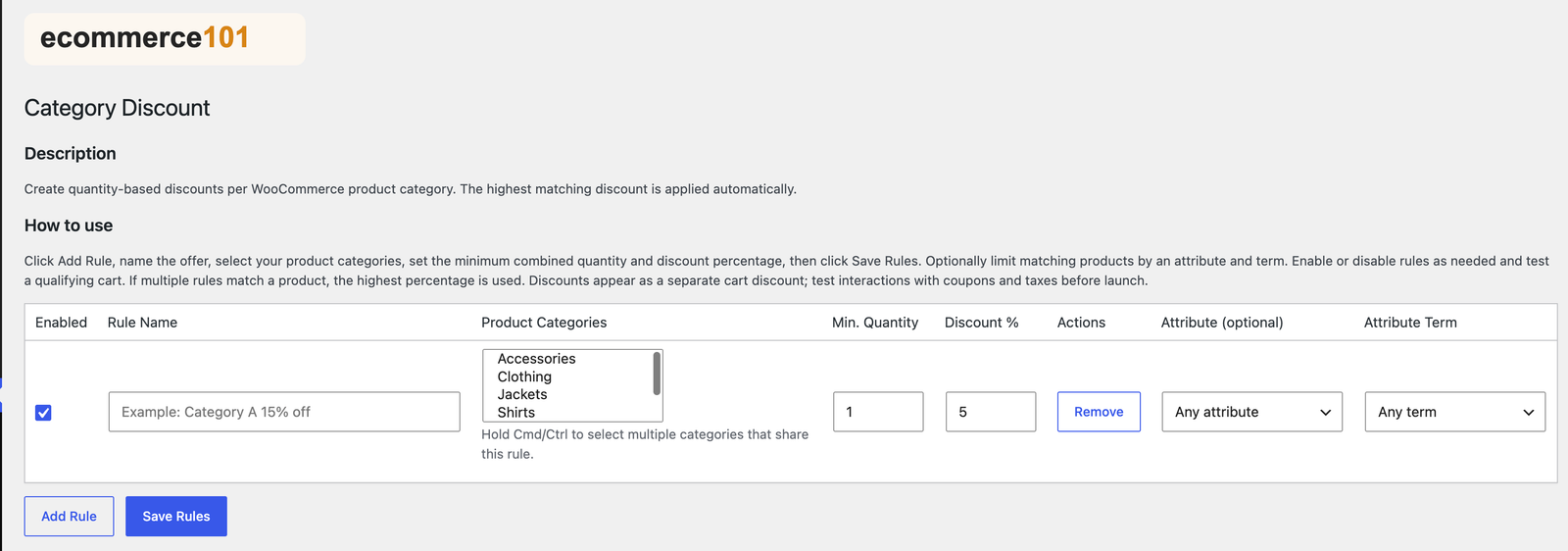
A look at the settings

Category Discount settings with Ecommerce101 branding

How to install and use

  1. Upload the ZIP through Plugins → Add New → Upload Plugin and activate it with WooCommerce active.
  2. Open WooCommerce → Category Discount and click Add Rule.
  3. Name the offer, choose product categories, and set the minimum quantity and discount percentage.
  4. Add an optional attribute and term, enable the rule, and click Save Rules.
  5. Test a qualifying cart, including your coupon and tax configuration.

Requirements and useful notes

  • Requires active WooCommerce and PHP 7.4+.
  • Discounts appear as a separate cart discount.
  • When multiple rules match a product, the highest matching percentage is used.
  • Configure your own categories and test offers against your store settings.

Need help with setup?

Contact Ecommerce101 with the plugin name and your store details.